
Textbasierte Schlagzeug-Notation mit Echtzeit-Wiedergabe — als Raster oder als echter Notensatz. Übe mit dem E-Drum-Set im Practice Mode, spiele auf der Bühne mit dem Concert Mode, exportiere nach PDF, MusicXML und MIDI. Für iPhone, iPad und Mac.
Du schreibst Text — Drum Charter setzt daraus echte Schlagzeugnoten. Oder das gewohnte Raster, in dem die Position die Zeit zeigt. Beides ist derselbe Chart.
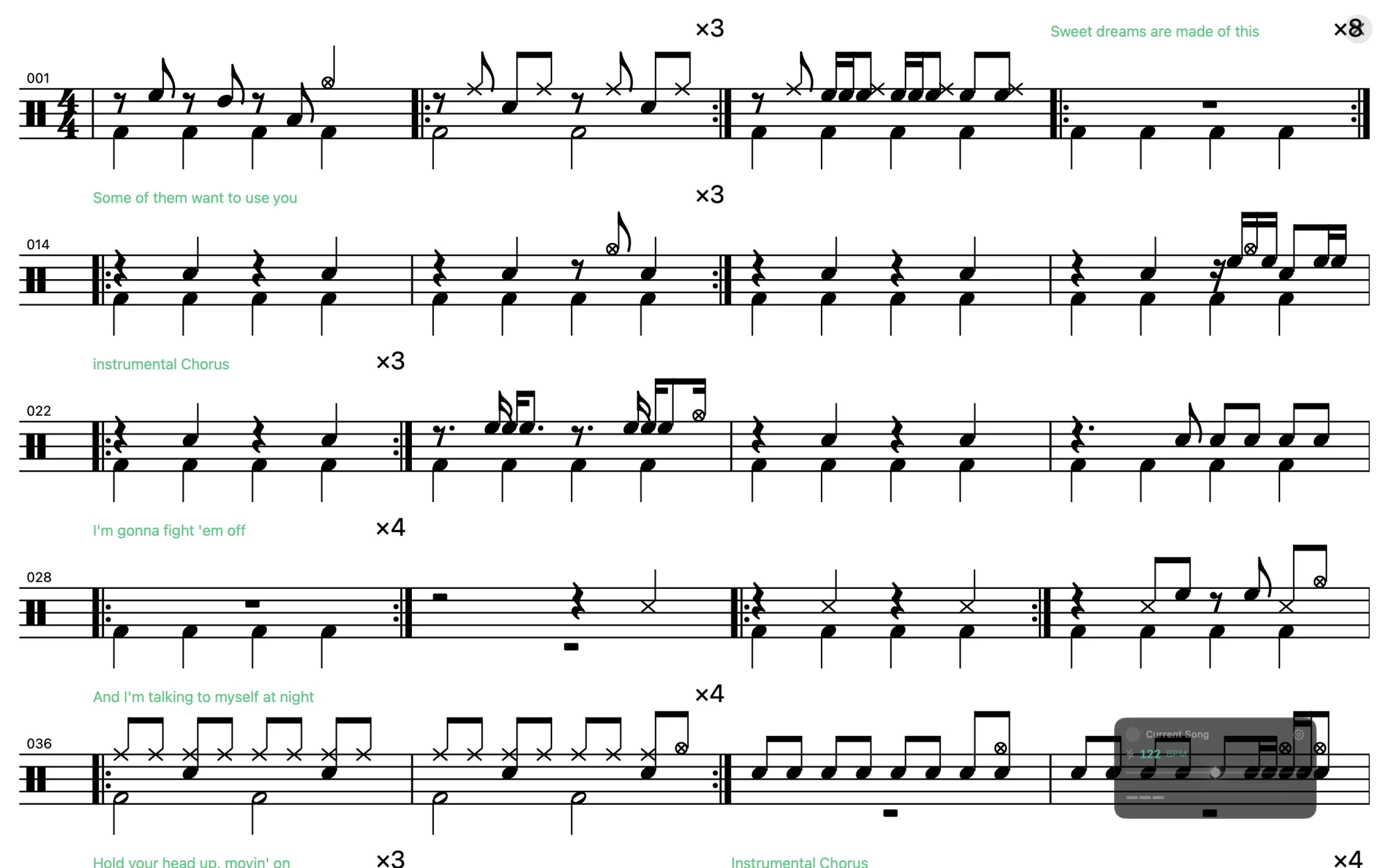
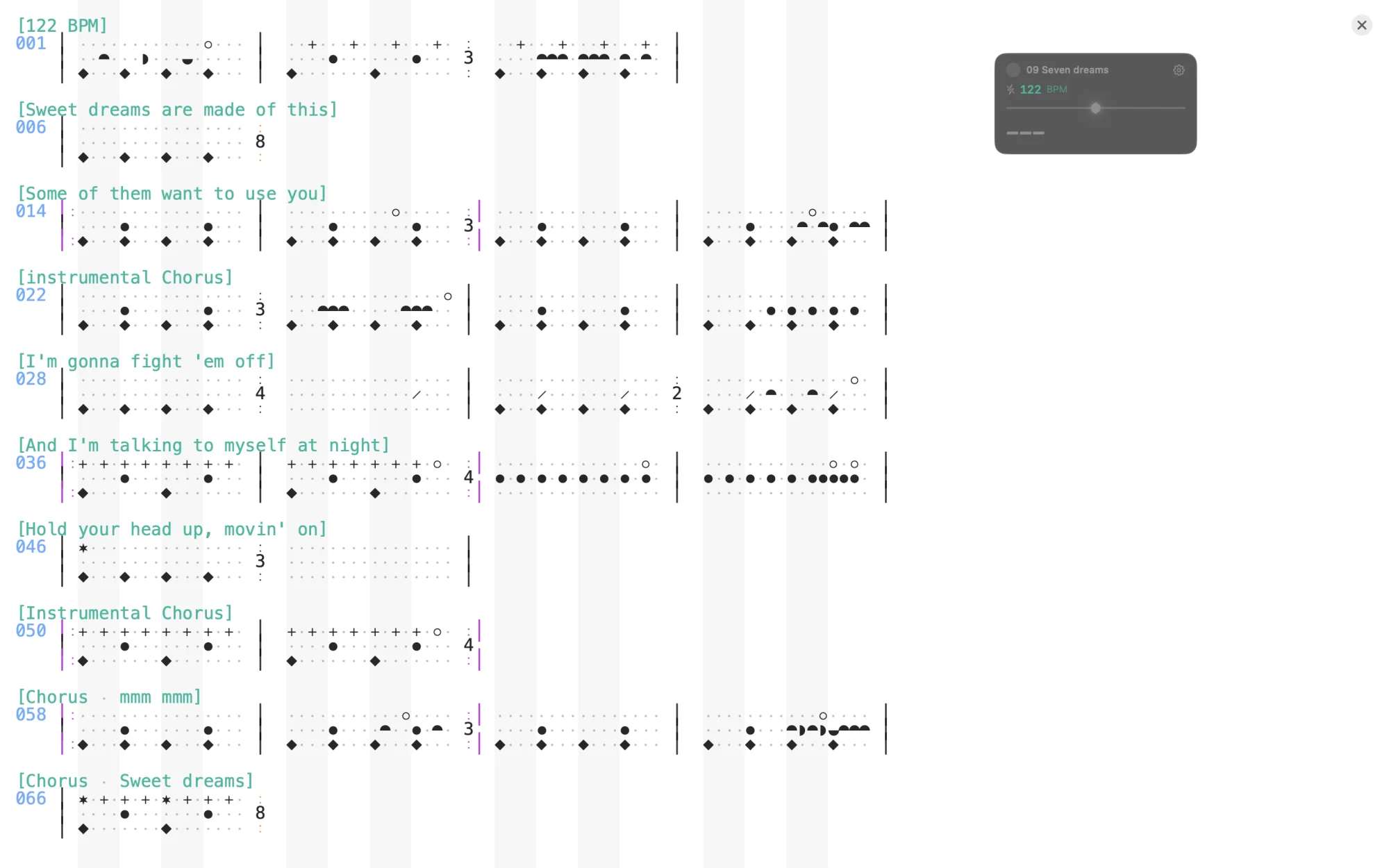
Derselbe Song im Concert Mode. Umschalten per [notation: staff] im Chart oder jederzeit im Einstellungspanel; im PDF-Export mit dem Schalter „Staff notation“.
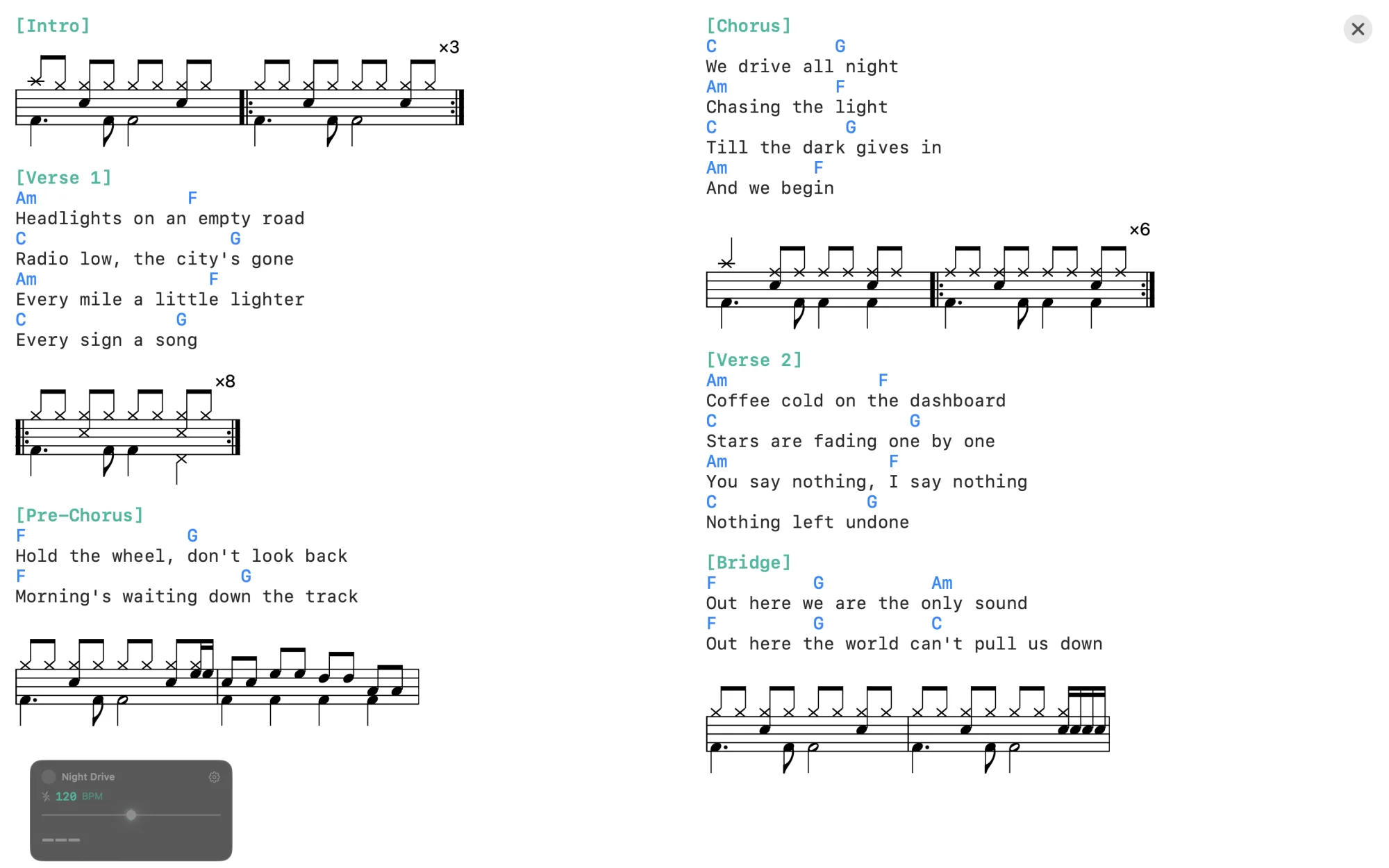
Die Drum-Takte in deinen Liedtexten stehen jetzt als Noten zwischen den Zeilen — auf der Bühne und auf Papier. Dazu Setlisten aus iCloud, in denen kein Song mehr still fehlt.
Steht ein Lyrics-Song auf [notation: staff], erscheinen seine eingebetteten Takte als kleine Notensysteme direkt zwischen Text und Akkorden — passend zur Schriftgröße, mit Wiederholungszeichen und Wiederholungszahl. Der Liedtext bleibt, wie er ist.
Der PDF-Export setzt Lyrics-Songs genauso: Text als Text, Takte als Noten, auf A4-Seiten verteilt. Ein Section-Header bleibt dabei nie allein unten auf der Seite stehen.
Songs im Ordner, die iCloud noch nicht heruntergeladen hat, werden beim Öffnen der Playlist geladen, statt im Set zu fehlen. Lässt sich einer trotzdem nicht lesen, nennt Drum Charter ihn samt Grund — vor dem Start, nicht erst auf der Bühne. Und ein Set von 1 bis 11 beginnt nicht mehr mit dem Finale.
Jeder Takt besteht aus drei Zeilen: Becken oben, Snare und Toms in der Mitte, Kick und Fuß-Hi-Hat unten. Einfache Symbole, die man direkt tippen kann. Die Beispiele unten erscheinen im hauseigenen Drum-Font — mit dem Schalter Drums / ASCII oben rechts siehst du den schlichten Text, der dahintersteckt.
Vier Takte mit Hi-Hat-Achtel, Snare-Backbeat auf 2 und 4, Four-on-the-Floor Kick. Der zweite Takt wird 4× wiederholt.
Ride-Cymbal, Brush-Snare auf Beat 2, leichte Kick auf 1. Swing-Feeling durch die Shuffle-Direktive.
Sechzehntel-Hi-Hat, lauter Backbeat auf 2 und 4, leise Ghost-Snares (º) dazwischen. Ein einzelner Takt, der mit (4×) vier Mal wiederholt wird.
Ruhiges Compound-Feel mit 12 Positionen pro Zeile. Cross-stick (/) statt lauter Snare, sparsame Kick.
Für Multiinstrumentalisten: Songtext und Akkorde statt Notation. Drum-Bars können eingebettet werden.
Alles was du brauchst um Drum-Charts zu schreiben, zu üben und live zu spielen — auf allen deinen Geräten.
Die Palette zeigt nur Symbole, die an deiner Cursor-Position gültig sind. Becken-Symbole in Zeile 1, Snare/Toms in Zeile 2, Kick/Pedal in Zeile 3. Keine Fehleingaben möglich.
Hochwertige Drum-Sounds mit FluidR3_GM Soundfont und 48tel-Präzisionsgrid. Drücke Play und höre dein Chart sofort. Tempo über Slider oder BPM-Metadata einstellbar.
Jedes Chart lässt sich als Schlagzeug-Notensatz lesen: Notenköpfe je Instrument, Balken, Pausen, Schlagzeugschlüssel, Triolen, Flams als Vorschlagsnoten, Ghost Notes in Klammern und Wiederholungszeichen. Pro Song mit [notation: staff] oder jederzeit im Concert Mode umschaltbar — das Raster bleibt gleichwertig daneben.
Zwei ausdrucksstarke Symbole: ö für Flam (schneller Vorschlag vor dem Hauptschlag) und º für Ghost Notes (leise Snare). Unverzichtbar für Jazz, Funk und dynamisches Spiel.
Platziere ³ vor zwei Noten: x³xx erzeugt eine Hi-Hat-Triole. Funktioniert auf allen drei Zeilen. Ideal für Shuffle, Swing und Fills.
Schreibe [Swing 67] oder einfach [Shuffle] in den Header. Werte von 50% (gerade) bis 75% (extrem). UI-Button mit 5 Presets. Authentischer Jazz/Blues-Feel.
4/4 (Standard, 16 Positionen), 3/4 (Walzer, 12 Positionen) und 6/8 (Jig, 12 Positionen). Taktart-Picker für schnellen Wechsel. Beat Grouping passt sich automatisch an.
Charts als PDF exportieren — als Raster mit optionalen Beat-Grouping-Streifen oder als echter Notensatz, seitenweise auf A4 umbrochen. Funktioniert auf iPhone, iPad und Mac. Perfekt zum Drucken, Teilen oder Archivieren.
MusicXML für MuseScore, Sibelius, Finale und Dorico — mit Taktarten, Triolen, Wiederholungen, Flams, Ghost Notes und Rehearsal Marks. MIDI-Dateien mit General-MIDI-Drum-Mapping für Logic Pro, GarageBand, Ableton und jede DAW.
Eigener Vollbildmodus zum Üben mit dem E-Drum-Set: frei wählbarer Loop-Bereich mit Vorzähler, jeder Schlag erscheint dort auf der Notation, wo er gelandet ist — grün, gelb oder orange nach Genauigkeit. Zeigt, ob du hetzt oder schleppst. Die Latenz wird gemessen und ausgeglichen.
Vollbild-Bühnenansicht als Raster mit großem Custom Font (10–40 pt) oder als Notensatz. Wiedergabe direkt auf der Bühne, Playlists aus einem Ordner, auf dem Mac im eigenen Vollbild-Space. Schriftgröße je Song mit [fontsize: N].
Charts mit Songtext und Akkorden. Abschnitts-Überschriften grün, Hinweiszeilen grau, Akkorde blau. Eingebettete Drum-Bars werden automatisch erkannt und auf Wunsch als Noten gesetzt. Mehrspaltig im Concert Mode.
Drei Symbole für gleichzeitige Snare+Tom-Schläge: p (Snare+Tom1), d (Snare+Tom2), g (Snare+FloorTom). Perfekt für Fills.
Drum Charter mischt sein Audio mit Apple Music, Spotify und jeder anderen App, statt sie stumm zu schalten. Starte den Song, drücke Play — beide laufen gleichzeitig.
Beginne ein Chart auf dem iPhone, bearbeite es auf dem iPad weiter, spiele es auf dem Mac im Concert Mode. Nahtlose iCloud-Synchronisation über alle Gerate.
Jeder Takt hat drei Zeilen. Jede Zeile hat ihre eigenen Symbole.
So sieht Drum Charter bei der Arbeit aus — auf dem Mac, dem iPad und dem iPhone.
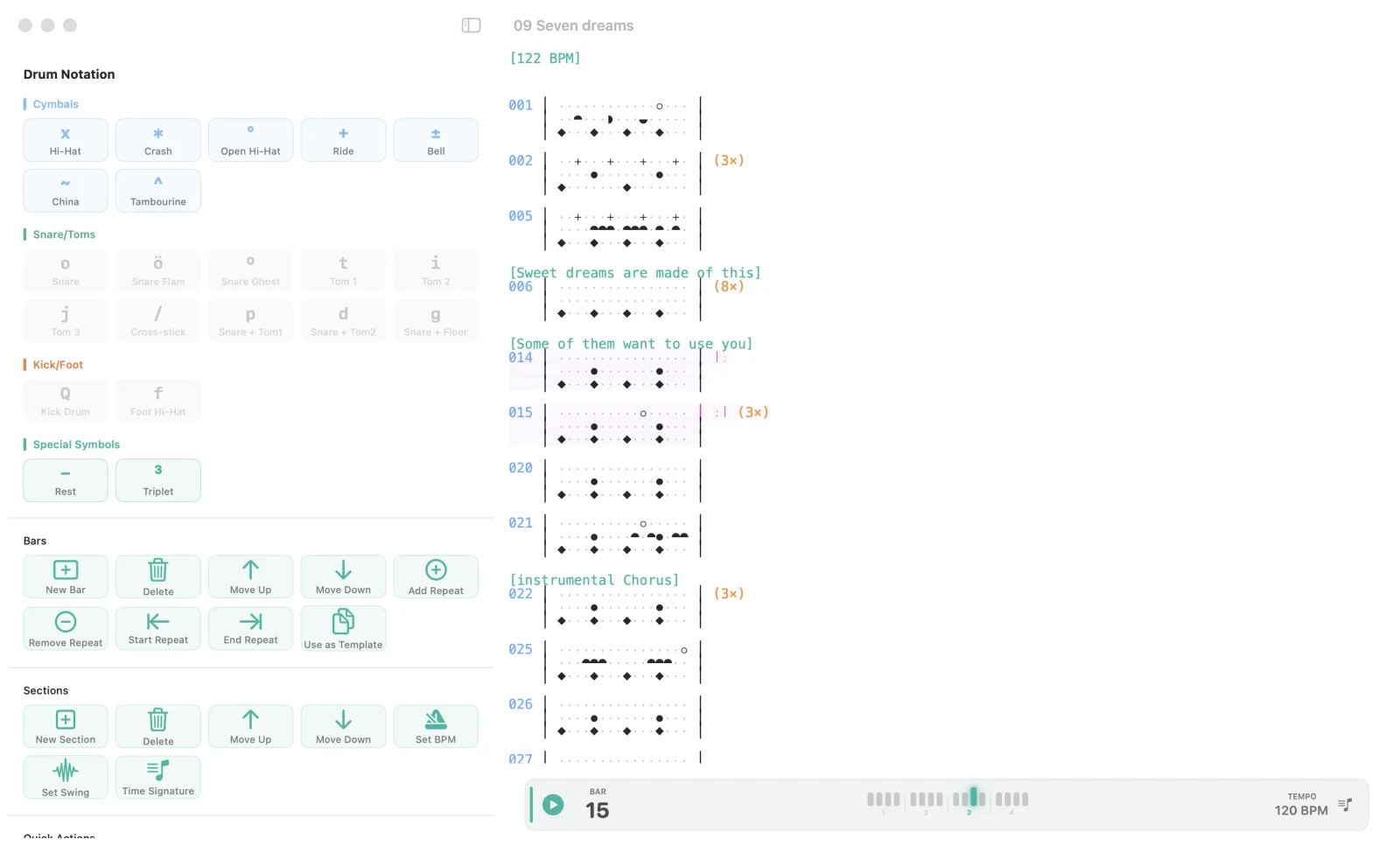
Die Palette zeigt nur, was an der Cursor-Position passt. Wiederholungen orange, Sections grün.
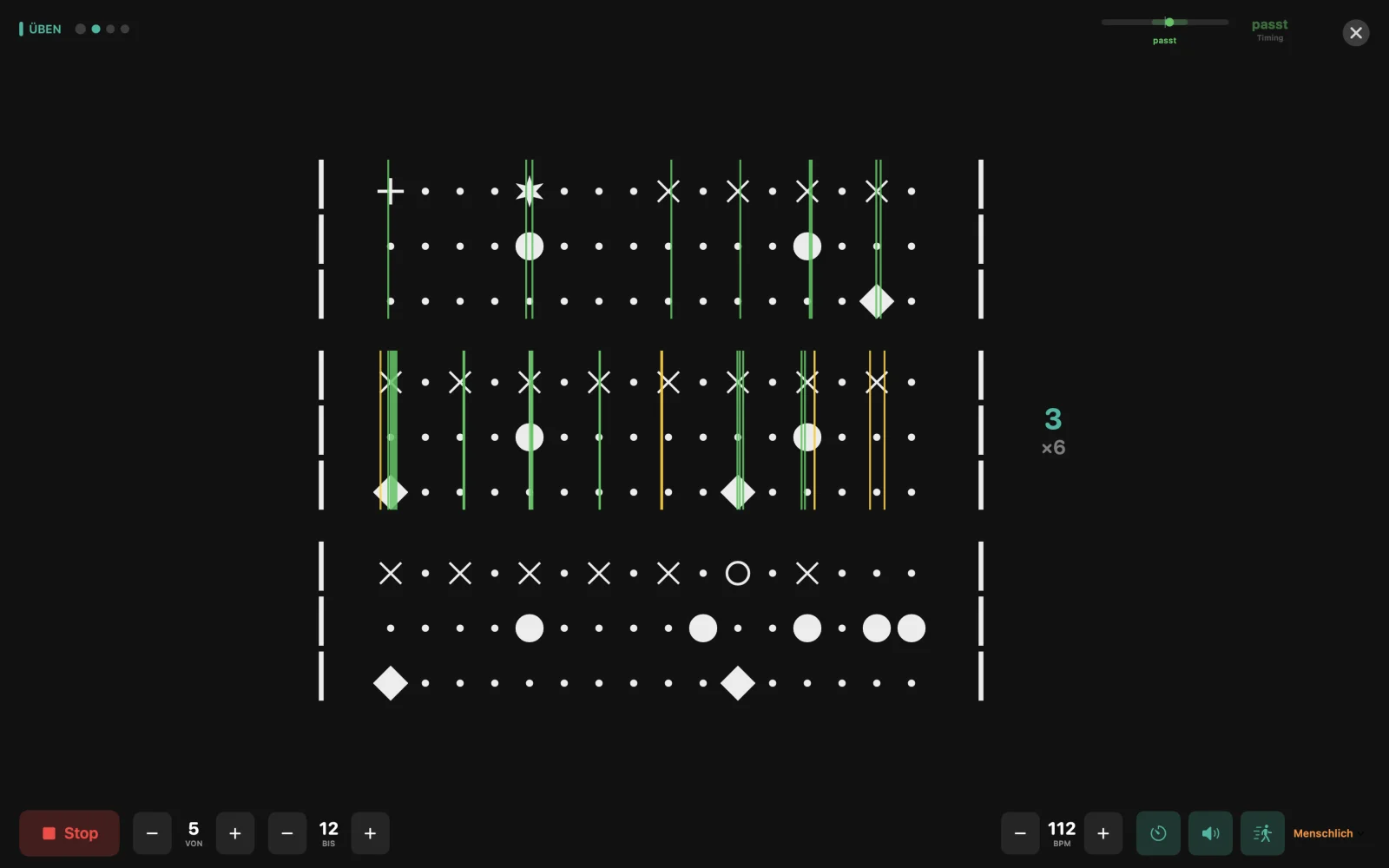
Jeder Schlag steht dort, wo er gelandet ist — grün, gelb oder orange. Oben rechts: ob du hetzt oder schleppst.
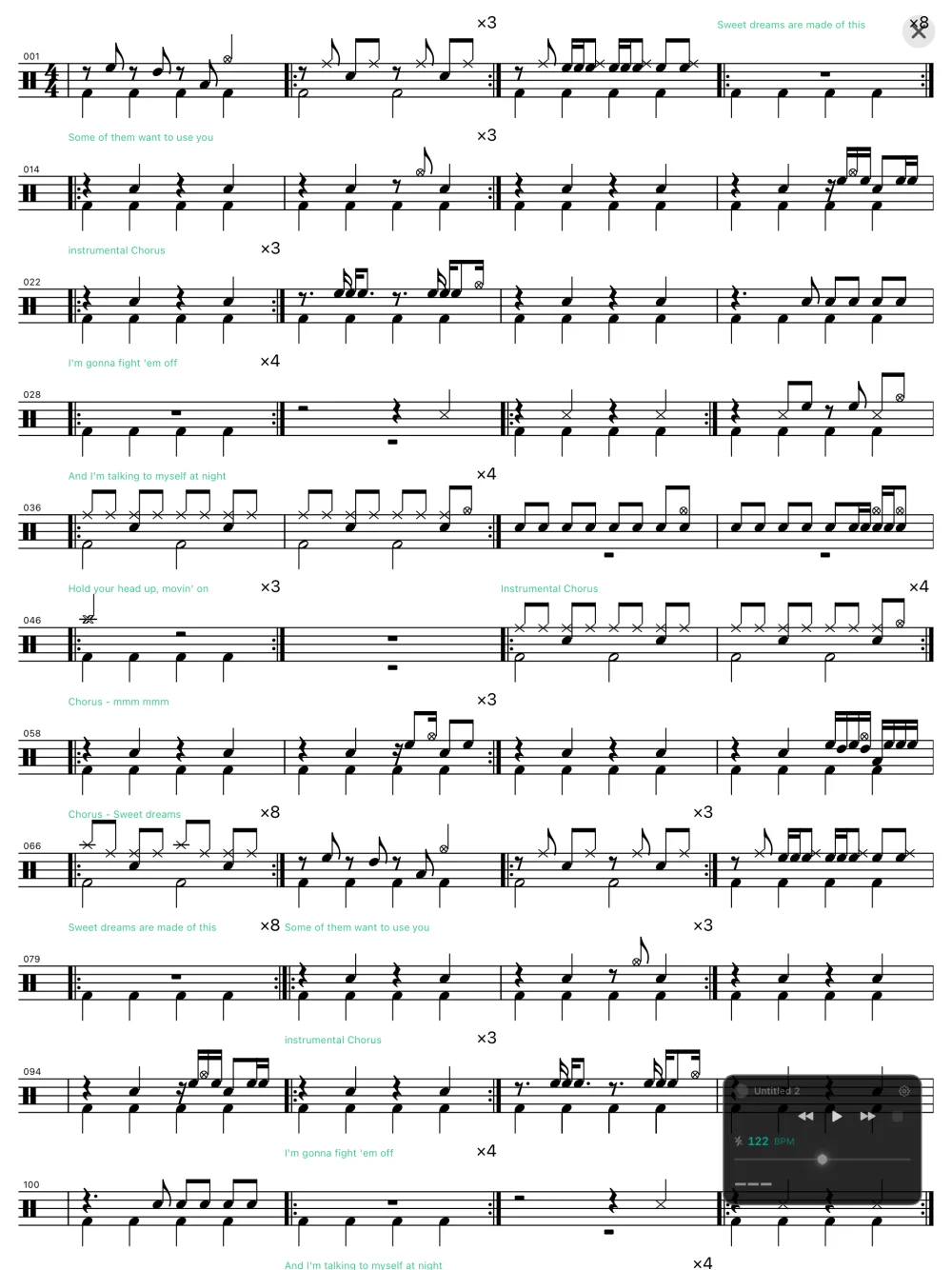
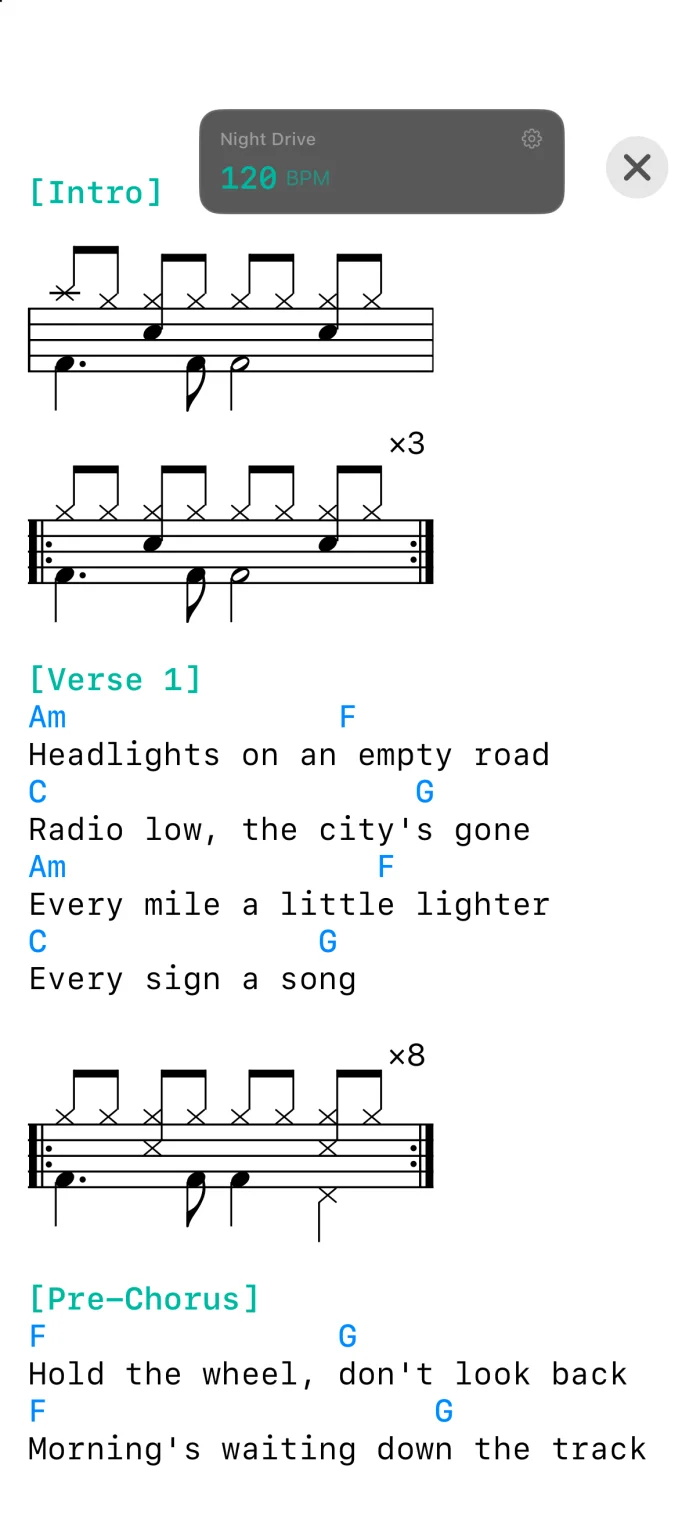
Der Notensatz füllt jede Breite: „Bars per Line“ bestimmt die Notengröße. Auf dem iPhone steht der Liedtext einspaltig, die Takte als Noten dazwischen.
Alle wichtigen Funktionen auf einen Tastendruck — auf Mac und iPad mit externer Tastatur.
Erstelle ein neues Dokument (Cmd+N), füge einen Takt ein (Cmd+B) und platziere den Cursor in eine der drei Zeilen. Die Symbol-Palette zeigt dir automatisch nur die Symbole, die an dieser Stelle gültig sind. Tippe x für Hi-Hat, o für Snare, Q für Kick — oder klicke ein Symbol in der Palette.
Drücke die Leertaste, um dein Chart sofort zu hören.
Öffne das Export-Menü und wähle „MusicXML“. Die erzeugte .musicxml-Datei kannst du direkt in MuseScore, Sibelius, Finale oder Dorico öffnen. Alle Notationselemente werden übertragen: Taktarten, Triolen, Wiederholungen, Flams, Ghost Notes, Swing-Markierungen und Abschnitts-Überschriften als Rehearsal Marks.
Über das Export-Menü → „MIDI File“ oder mit Cmd+Shift+M. Die .mid-Datei nutzt das General-MIDI-Drum-Mapping auf Kanal 10. Im Dialog wählst du, ob die Snare/Tom-Stimme (mittlere Zeile) nach oben zu den Becken oder nach unten zu den Füßen notiert wird — und kannst das BPM überschreiben. Swing, Triolen, Flams und Ghost Notes werden mit übertragen.
Platziere das ³-Symbol vor den letzten zwei Noten einer Dreiergruppe. Beispiel: x³xx erzeugt eine Hi-Hat-Triole. Die drei Noten teilen sich den Platz von zwei 16tel-Noten. Triolen funktionieren auf allen drei Zeilen und können mit Swing kombiniert werden.
Ja! Seit Version 2.0 mischt Drum Charter sein Audio mit anderen Apps. Starte deinen Song in Apple Music, Spotify oder jeder anderen App, öffne dein Chart in Drum Charter und drücke Play — beide spielen gleichzeitig.
Ja. Drum Charter nutzt die dokumentbasierte Architektur von iOS und macOS. Speichere deine Charts in iCloud Drive, und sie werden automatisch auf all deinen Geräten synchronisiert. Beginne auf dem iPhone, arbeite auf dem iPad weiter, spiele auf dem Mac.
Nein. Drum Charter nutzt eine einfache Text-Notation: Jeder Takt hat drei Zeilen (Becken, Snare/Toms, Kick/Fuß), und du tippst Zeichen wie x, o und Q auf ein Raster aus 16 Positionen. Die Symbol-Palette zeigt dir an jeder Stelle, was möglich ist. Wer schon mal einen Beat im Kopf hatte, kann ihn hier in Minuten aufschreiben.
Ja, seit Version 2.2. Schreib [notation: staff] in den Header, dann steht der Song im Concert Mode als Notensatz auf dem Fünfliniensystem — oder schalte im Einstellungspanel des Concert Mode jederzeit zwischen Grid (Raster) und Staff (Notensatz) um. „Bars per Line“ bestimmt dort zugleich die Notengröße. In Lyrics-Songs bleibt der Text Text; seit 2.3 stehen die eingebetteten Takte dann als Noten zwischen den Zeilen. Derselbe Notensatz steht auch im PDF-Export zur Wahl.
Drum Charter unterstützt 4/4 (16 Positionen pro Takt), 3/4 und 6/8 (je 12 Positionen). Setze die Taktart als Direktive an den Anfang, z. B. [3/4], oder nutze den Taktart-Picker. Das Tempo reicht von 60 bis 200 BPM — per [120 BPM] im Header oder jederzeit über den Tempo-Regler.
Schreibe [Shuffle] oder [Swing 67] in den Header. Swing verschiebt die Achtel-Offbeats zeitlich nach hinten und erzeugt das „schwingende“ Gefühl. Werte von 50 % (völlig gerade) über 67 % (klassischer Shuffle) bis 75 % (extrem). Swing wirkt in 4/4 und lässt sich mit Triolen kombinieren.
Ja. Verbinde dein E-Drum-Set per USB oder Bluetooth MIDI und öffne den Practice Mode (Cmd+Shift+P). Während du im Loop mitspielst, erscheint jeder Schlag dort auf der Notation, wo er gelandet ist — grün, gelb oder orange je nach Genauigkeit, ausgelassene Schläge mit einem Ring. So siehst du sofort, ob du eilst oder schleppst. Die Ausgabeverzögerung von Lautsprecher oder Bluetooth wird gemessen und automatisch ausgeglichen. Zusätzlich erkennt die App dein Live-Tempo in Echtzeit.
Ja. Exportiere als PDF (Cmd+Shift+D oder über das Share-Sheet) — als Raster, wahlweise mit dezenten Beat-Grouping-Streifen als Lese-Hilfe, oder mit dem Schalter „Staff notation“ als echter Notensatz auf A4. Ideal für den Notenständer oder zum Teilen mit der Band. Zum Weiterbearbeiten in MuseScore, Sibelius oder Dorico gibt es den MusicXML-Export.
Prüfe folgende Punkte:
Schreib uns eine E-Mail — wir antworten innerhalb von 24–48 Stunden.
support@drumcharter.quantum-locked.netText-based drum notation with real-time playback — as a grid or as real staff notation. Practise with your e-drum kit in Practice Mode, perform on stage with Concert Mode, export to PDF, MusicXML, and MIDI. For iPhone, iPad, and Mac.
You write text — Drum Charter engraves it as real drum notation. Or as the familiar grid, where position shows time. Both are the same chart.
The same song in Concert Mode. Switch with [notation: staff] in the chart or at any time in the settings panel; in the PDF export with the “Staff notation” switch.
The drum bars inside your lyrics now appear as notes between the lines — on stage and on paper. Plus setlists from iCloud where no song goes missing silently.
When a lyrics song is set to [notation: staff], its embedded bars appear as small staves right between the lyrics and chords — sized to your font, with repeat signs and repeat counts. The lyrics stay exactly as they are.
The PDF export sets lyrics songs the same way: text as text, bars as notes, spread across A4 pages. A section header never ends up alone at the bottom of a page.
Songs in the folder that iCloud has not downloaded yet are fetched when the playlist opens, instead of missing from the set. If one still cannot be read, Drum Charter names it and the reason — before the set starts, not on stage. And a set from 1 to 11 no longer starts with the finale.
Each bar consists of three lines: cymbals on top, snare and toms in the middle, kick and foot hi-hat on the bottom. Simple symbols you can type directly. The examples below appear in the app's own drum font — use the Drums / ASCII switch at the top right to reveal the plain text underneath.
Four bars with eighth-note hi-hat, snare backbeat on 2 and 4, four-on-the-floor kick. The second bar repeats 4×.
Ride cymbal, brush snare on beat 2, soft kick on 1. Swing feel via the Shuffle directive.
Sixteenth-note hi-hat, loud backbeat on 2 and 4, quiet ghost snares (º) in between. A single bar, repeated four times with (4×).
Calm compound feel with 12 positions per line. Cross-stick (/) instead of loud snare, sparse kick.
For multi-instrumentalists: lyrics and chords instead of notation. Drum bars can be embedded.
Everything you need to write drum charts, practice, and perform live — across all your devices.
The palette shows only symbols valid at your cursor position. Cymbal symbols in line 1, snare/toms in line 2, kick/pedal in line 3. No invalid input possible.
High-quality drum sounds with FluidR3_GM soundfont and 48th-note precision grid. Press Play and hear your chart instantly. Tempo adjustable via slider or BPM metadata.
Read any chart as drum notation: noteheads per instrument, beams, rests, drum clef, triplets, flams as grace notes, ghost notes in brackets, and repeat signs. Per song with [notation: staff] or switch at any time in Concert Mode — the grid stays an equal alternative.
Two expressive symbols: ö for flam (quick grace note before the main hit) and º for ghost notes (quiet snare). Essential for jazz, funk, and dynamic playing.
Place ³ before two notes: x³xx creates a hi-hat triplet. Works on all three lines. Ideal for shuffle, swing, and fills.
Write [Swing 67] or simply [Shuffle] in your header. Values from 50% (straight) to 75% (extreme). UI button with 5 presets. Authentic jazz/blues feel.
4/4 (standard, 16 positions), 3/4 (waltz, 12 positions), and 6/8 (jig, 12 positions). Time signature picker for quick changes. Beat grouping adapts automatically.
Export charts as PDF — as a grid with optional beat grouping stripes, or as real staff notation broken across A4 pages. Works on iPhone, iPad, and Mac. Perfect for printing, sharing, or archiving.
MusicXML for MuseScore, Sibelius, Finale, and Dorico — with time signatures, triplets, repeats, flams, ghost notes, and rehearsal marks. MIDI files with General MIDI drum mapping for Logic Pro, GarageBand, Ableton, and any DAW.
A full-screen mode for practising with your e-drum kit: any loop range with a count-in, and every hit appears on the notation where it landed — green, yellow, or orange by accuracy. Shows whether you are rushing or dragging. Latency is measured and compensated.
Full-screen stage view as a grid with a large custom font (10–40 pt) or as staff notation. Playback right on stage, playlists from a folder, and its own fullscreen Space on the Mac. Font size per song with [fontsize: N].
Charts with lyrics and chords. Section headers in teal, cue lines in gray, chords in blue. Embedded drum bars are detected automatically and can be set as notes. Multi-column in Concert Mode.
Three symbols for simultaneous snare+tom hits: p (snare+tom1), d (snare+tom2), g (snare+floor tom). Perfect for fills.
Drum Charter mixes its audio with Apple Music, Spotify, and any other app instead of silencing them. Start the song, press Play — both run at the same time.
Start a chart on your iPhone, edit it on your iPad, play it on your Mac in Concert Mode. Seamless iCloud synchronization across all devices.
Each bar has three lines. Each line has its own symbols.
What Drum Charter looks like at work — on the Mac, the iPad, and the iPhone.
The palette shows only what fits at the cursor. Repeats in orange, sections in green.
Every hit appears where it landed — green, yellow, or orange. Top right: whether you are rushing or dragging.
The notation fills any width: “Bars per Line” sets the note size. On the iPhone the lyrics run in one column, with the bars as notes in between.
All essential functions at a keypress — on Mac and iPad with external keyboard.
Create a new document (Cmd+N), insert a bar (Cmd+B), and place your cursor in one of the three lines. The symbol palette automatically shows only the symbols valid at that position. Type x for hi-hat, o for snare, Q for kick — or click a symbol in the palette.
Press Space to hear your chart instantly.
Open the Export menu and choose “MusicXML.” The generated .musicxml file opens directly in MuseScore, Sibelius, Finale, or Dorico. All notation elements transfer: time signatures, triplets, repeats, flams, ghost notes, swing markings, and section headers as rehearsal marks.
Via Export menu → “MIDI File” or with Cmd+Shift+M. The .mid file uses the General MIDI drum mapping on channel 10. In the dialog you choose whether the snare/tom voice (middle line) is notated up with the cymbals or down with the feet — and you can override the BPM. Swing, triplets, flams, and ghost notes all transfer.
Place the ³ symbol before the last two notes of a group of three. Example: x³xx creates a hi-hat triplet. The three notes share the space of two sixteenth notes. Triplets work on all three lines and combine with swing.
Yes! Since version 2.0, Drum Charter mixes its audio with other apps. Start your song in Apple Music, Spotify, or any other app, open your chart in Drum Charter, and press Play — both play simultaneously.
Yes. Drum Charter uses the document-based architecture of iOS and macOS. Save your charts to iCloud Drive and they sync automatically across all your devices. Start on your iPhone, continue on your iPad, perform on your Mac.
No. Drum Charter uses a simple text notation: each bar has three lines (cymbals, snare/toms, kick/foot), and you type characters like x, o, and Q onto a 16-position grid. The symbol palette shows what's possible at every spot. If you've ever had a beat in your head, you can write it down here in minutes.
Yes, since version 2.2. Write [notation: staff] in the header and the song appears in Concert Mode as notation on a five-line staff — or switch between Grid and Staff at any time in the Concert Mode settings. “Bars per Line” then also sets the note size. In lyrics songs the text stays text; since 2.3 the embedded bars appear as notes between the lines. The same notation is also available in the PDF export.
Drum Charter supports 4/4 (16 positions per bar), 3/4 and 6/8 (12 positions each). Set the time signature as a directive at the top, e.g. [3/4], or use the time-signature picker. Tempo ranges from 60 to 200 BPM — via [120 BPM] in the header or the tempo slider anytime.
Write [Shuffle] or [Swing 67] in the header. Swing pushes the eighth-note offbeats later in time, creating that loping feel. Values from 50% (perfectly straight) through 67% (classic shuffle) to 75% (extreme). Swing applies in 4/4 and combines with triplets.
Yes. Connect your e-drum kit via USB or Bluetooth MIDI and open Practice Mode (Cmd+Shift+P). As you play along with the loop, every hit appears on the notation where it landed — green, yellow, or orange by accuracy, with missed notes marked by a ring. So you instantly see whether you're rushing or dragging. The output delay of speakers or Bluetooth is measured and compensated automatically. The app also detects your live tempo in real time.
Yes. Export as PDF (Cmd+Shift+D or via the share sheet) — as a grid, optionally with subtle beat-grouping stripes as a reading aid, or with the “Staff notation” switch as real notation on A4. Great for the music stand or sharing with the band. To keep editing in MuseScore, Sibelius, or Dorico, use the MusicXML export.
Check these points: